BasinCheck vs Excel for Safety Audits
Excel works right up until an inspector asks you to prove a corrective action happened. BasinCheck gives you audit-ready safety records for crews that work where there's no cell signal and no IT department - built for the field, not a desk.

Daily Rig Inspection
3 of 6 items complete
TL;DR
Excel is excellent for analyzing numbers - and it's free and familiar. But it was never built to run a safety program: no automatic follow-ups, no real-time visibility, and no defensible audit trail. BasinCheck is purpose-built for field safety - mobile, offline-capable, with corrective actions and an OSHA-ready record that happen automatically. It was built for rig crews, so it survives the conditions Excel-on-a-phone can't: no signal, gloves, dust, and crew turnover.
Stick with Excel if safety is a handful of one-off checklists you never have to defend. Switch to BasinCheck the moment you need to prove compliance across multiple crews.
Where Excel Falls Short for Safety
Spreadsheets are powerful for data analysis. But safety management needs accountability, automation, and a record you can defend - and that's exactly where Excel runs out of room.
A spreadsheet records that the guardrail failed inspection. It won't assign the repair, set a due date, or chase anyone. The corrective action lives in someone's inbox - or their memory.
Rig7_Inspection_FINAL_v3_USE_THIS.xlsx. Copies get emailed, edited on three laptops, and saved to different folders. When it matters most, no one trusts which version is real.
You can't see what happened in the field until someone remembers to open the file and send it in. By then the crew has moved to the next location and the photo is gone.
Reminder emails, status chasing, monthly reports, audit-prep - all done by hand. The busier the field gets, the more falls through the cracks.
When an operator or OSHA asks for the signed inspection from a job three months ago, you're searching shared drives and inboxes hoping the file still exists.
Anyone can change any cell, anytime, with no record. A spreadsheet can't prove who did what, when - which is exactly what inspectors want to see.
Excel Can't Create an Audit Trail
When OSHA or an operator says "prove it happened", a spreadsheet has no answer. Excel lacks the fundamental capabilities compliance documentation requires.
No real timestamps: When was it actually completed? The file date isn't proof.
No approval workflows: No record of manager sign-off.
No edit history: Anyone can change any cell, anytime, silently.
No photo proof: No way to show a photo was taken on-site, when, or where.
Automatic timestamps: Every action logged with date, time, and user.
Digital sign-offs: Manager approvals captured in the record.
Immutable records: A complete, tamper-evident history of every change.
GPS-tagged photos: Proof of exactly where and when each photo was taken.
A complete audit trail shows inspectors exactly what happened, when, and who was responsible.
Same Failed Inspection, Two Very Different Days
A handrail fails inspection on a location 40 miles from the office, with no bars on the phone. Here's how the same event plays out on a spreadsheet versus in BasinCheck.
- The supervisor notes it on a paper form or a phone spreadsheet row. The photo sits in the camera roll.
- Back at the yard that evening, the file gets emailed in - if anyone remembers, and if signal allows.
- Someone retypes it into the master tracker. The corrective action goes on a separate tab nobody owns.
- Two weeks later, no one is sure the handrail was actually fixed. The photo is buried in a phone.
- An operator audit lands. You spend an afternoon trying to prove a repair you can't fully document.
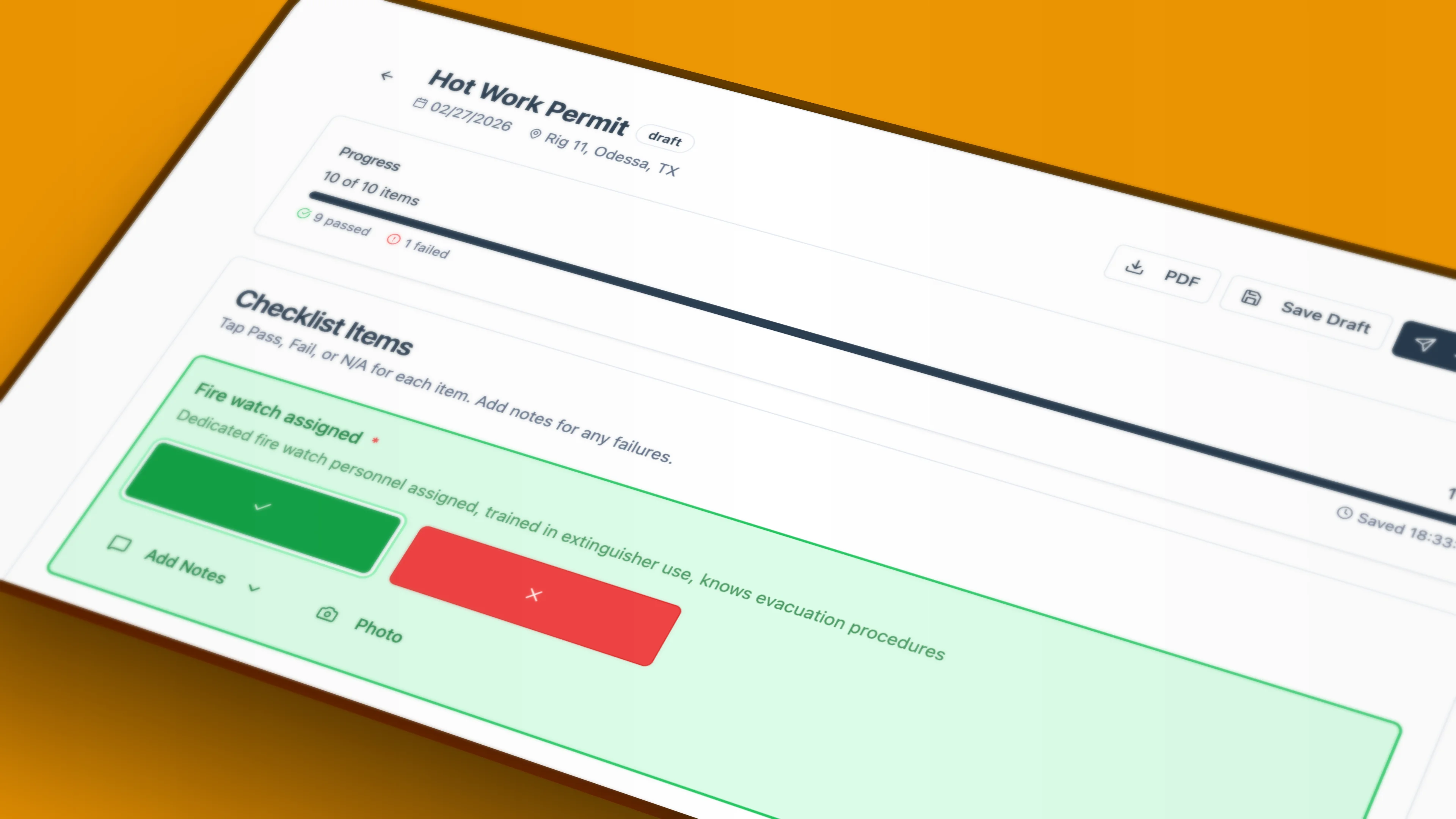
- The supervisor taps "fail" on the handrail item - the audit works fully offline.
- A GPS-tagged photo attaches to that exact item, with the time and place baked in.
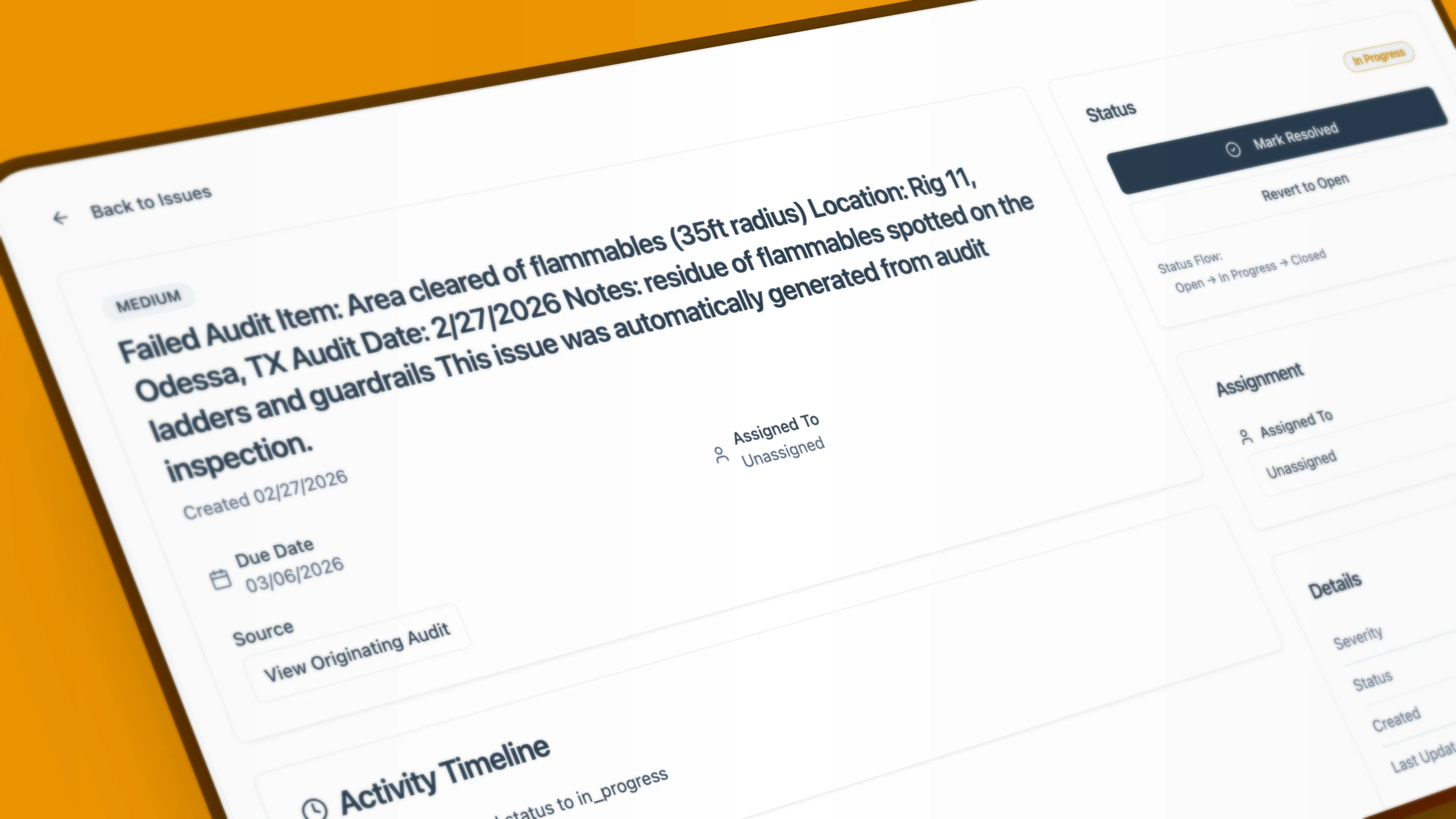
- A corrective action is created automatically: assigned, due-dated, and the owner is notified.
- When the truck hits signal, everything syncs. The safety manager already sees the open issue.
- The fix is logged with a timestamp and sign-off. The operator audit takes minutes - pull the record, show the trail.
The difference isn't the checklist. It's everything that has to happen after an item fails - and whether it happens on its own or by hand.
See it in action
What Replaces Your Spreadsheets
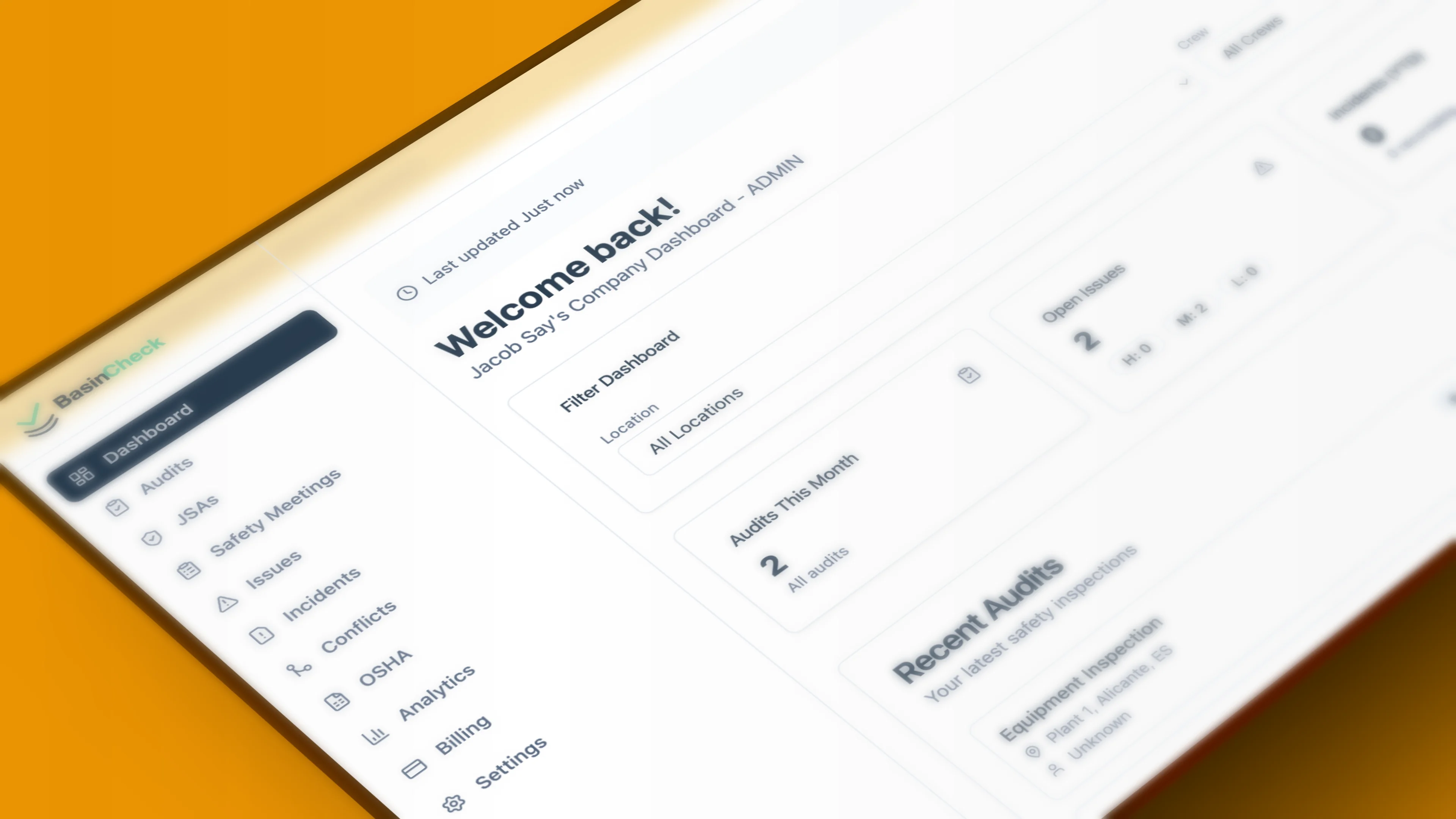
This is the difference between recording that an inspection happened and actually running a safety program. Here's BasinCheck doing the work Excel can't.
Daily Rig Inspection
3 of 6 items complete
Complete audits in the field — even with no signal. Syncs automatically when you reconnect.
Every Spreadsheet, Replaced
The tabs, trackers, and email chains you maintain by hand become one connected system.
What Teams Say About Spreadsheet Safety Systems
What do safety managers say? Here are common challenges with paper and spreadsheet-based safety systems.
“Excel works until an inspector asks for proof of follow-ups. Then it turns into a scramble.”
- Safety manager, oilfield services (anonymized)
“We had inspections in spreadsheets, but corrective actions lived in emails and people's heads.”
- EHS coordinator, contractor (anonymized)
Quotes are anonymized excerpts from public industry discussions describing common challenges with paper- and spreadsheet-based safety systems.
Feature Comparison
What you get with purpose-built safety software vs spreadsheets
| Feature | BasinCheck | Excel / Spreadsheets |
|---|---|---|
| Mobile-first field audits | ||
| Offline capability | ||
| Photo attachments with auto-organization | ||
| Automatic corrective action tracking | ||
| Email notifications for assignments | ||
| Audit trail for compliance | ||
| Real-time visibility across crews | ||
| OSHA 300 log generation | ||
| Unlimited users, flat rate | n/a | |
| Role-based access control | ||
| PDF export for audits |
Feature comparison based on typical spreadsheet-based workflows. Your specific setup may vary.
Why Teams Switch
The breaking point isn't usually the spreadsheet itself - it's what happens when you need to prove compliance.
Corrective Actions Create Themselves
When an audit item fails, BasinCheck creates a corrective action automatically - assigned, dated, and emailed to the right person. No manual tracking, nothing forgotten.
Real-Time Dashboard
See audit completion, open issues, and compliance trends across every crew and location the moment they happen - not days later when a spreadsheet finally syncs.
Built for Phones in the Field
Tap to pass or fail, attach photos on the spot, works offline with bad signal. A full audit takes under 60 seconds - faster than filling out a single spreadsheet row.
Proof in Seconds, Not Hours
Every action is timestamped, signed off, and stored. When inspectors ask for documentation, you pull up a complete audit trail instead of digging through shared drives.
The Real Cost Comparison
"Free" spreadsheets have hidden costs that show up later.
Time: Hours spent manually tracking follow-ups, sending reminder emails, and preparing audit documentation
Risk: OSHA fines average $16,550 per serious violation. Documentation gaps make violations more likely.
Contracts: Lost business when operators require documented safety programs you can't demonstrate.
Starter: $149/month - unlimited users, 50 field records/mo
Standard: $299/month - unlimited users, 150 field records/mo
Pro: $599/month - unlimited users and field records
One OSHA fine pays for 10+ years of BasinCheck.
Compare Costs Interactively
Use our free EHS ROI calculator to compare BasinCheck vs spreadsheets, SafetyCulture, KPA, and other platforms based on your crew size.
Try the ROI CalculatorEverything You Need for Field Safety Management
Purpose-built features for oilfield operations, from rig inspections to OSHA compliance.
How Teams Move Off Spreadsheets
You don't have to rebuild your safety program or risk your records. Teams switch one crew at a time, on their own schedule - no big-bang cutover.
Keep your checklists
Map your existing Excel checklists to BasinCheck templates, item for item. There's nothing to recreate from scratch - your checklist structure carries over.
Start with one crew
Run BasinCheck alongside your spreadsheets on a single crew or location for a week. No big-bang cutover, no risk to your current records.
Bring your archive
Keep your historical Excel files for reference. During onboarding we help import the audit history that's worth migrating.
Switch the rest
Once one crew is faster on their phones than they were in spreadsheets, roll out to everyone. Most teams are fully moved within two weeks.
Who Each Is Right For
An honest take - the right tool depends on what you have to prove and to whom.
You run a handful of one-off checklists nobody audits.
Safety records never need to be defended to OSHA or operators.
One person owns every file and there's no field crew.
You mainly need ad-hoc number-crunching, not workflows.
You manage safety across multiple crews or locations.
You have to prove corrective actions actually closed out.
Field teams work on phones and tablets, often offline.
Operators or OSHA require a documented, defensible program.
Enterprise EHS? Check the Fine Print.
Switching from Enablon, Intelex, or VelocityEHS? Here's what you won't pay with BasinCheck.
| Feature | BasinCheck | Enterprise EHS |
|---|---|---|
| Offline capability | ||
| Photo attachments with auto-organization | ||
| Automatic corrective action tracking | ||
| OSHA 300 log generation | ||
| Unlimited users, flat rate | ||
| Add new location | $0, self-service | $500+ per ticket |
| Add/remove users | $0 (self-service) | Support ticket required |
| Create audit templates | $0 (self-service) | Professional services |
| Annual maintenance fees | $0 | $50k-200k+ |
| Implementation time | Same day | 3–6 months |
| Training required | Minimal (intuitive UI) | Weeks of training |
Based on reported costs from companies switching from Enablon, Intelex, and similar enterprise platforms. Your specific setup may vary.
Frequently Asked Questions
Ready to Upgrade from Spreadsheets?
Join oilfield contractors who switched from Excel to BasinCheck and got the audit trail they needed.